


iReal Pro
4.7787.00 Reviews
App Specs
- Version
- Varies with Device
- Updated On
- License
- $21.99
- Downloads
- 500,000+
- Developer
- Technimo
- Categories
- Music & Audio
- Platform
- Android, iOS
Screenshots
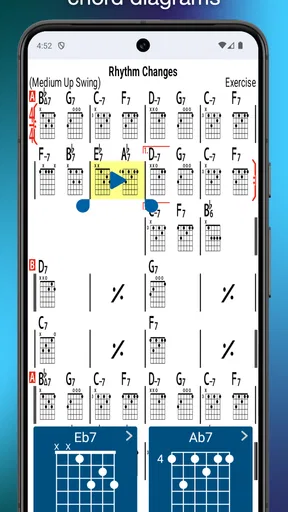
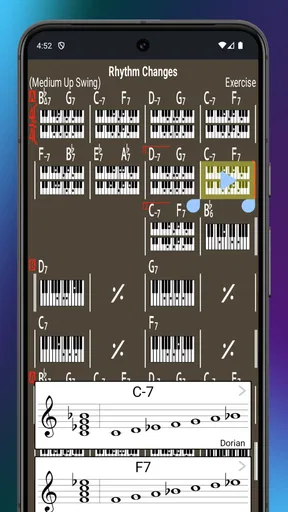
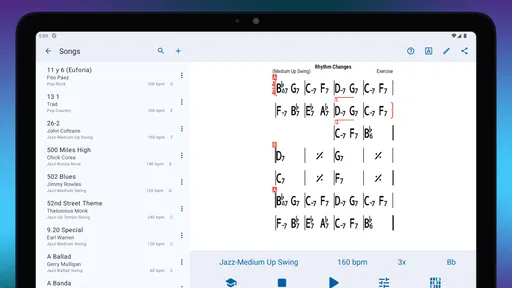
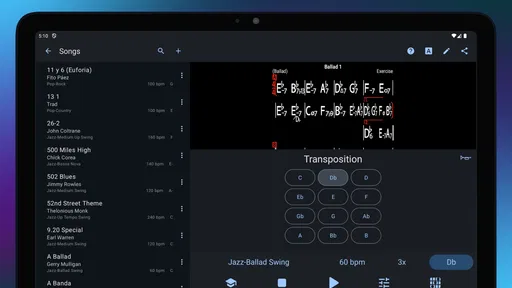
 Analysis by AppCompare
When I want to work through a tune without arranging a rehearsal around other people’s schedules, I like having a backing band I can shape to the task. That is the practical appeal of iReal Pro: Backing Tracks: it brings chord charts and play-along accompaniment together, so I can move from an idea on the page to a focused practice session without switching between several tools.
A useful starting point for a practice plan
I find this app most valuable when I already have a musical goal in mind: getting comfortable with a progression, hearing how a tune sits in another key, or building confidence improvising over changes. Rather than treating a backing track as something to put on and passively listen to, I can use the chart as a map and decide what I want to work on before I press play.
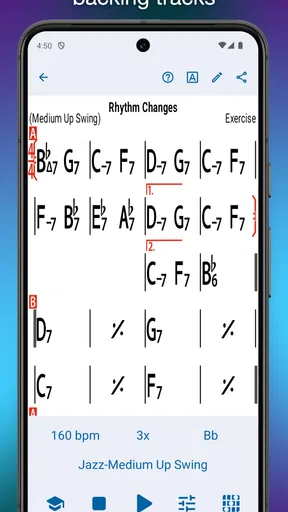
A realistic example is a guitarist with a short window to practise after work. They can open a chart, adjust the key to suit the instrument or current exercise, then play through the progression with accompaniment. The arrangement provides a sense of harmonic movement that a metronome alone cannot offer, while the chart keeps the session anchored to the changes. That combination makes the app especially handy for turning a spare half-hour into purposeful practice.
Where it fits among music apps
Compared with a metronome, music book apps, or a folder of audio tracks, iReal Pro is more interactive: the chart and accompaniment work together, and you can adjust musical material to suit the session. A metronome remains the better choice when you only need a plain pulse and want the least distraction. A conventional recording is better when your aim is to study a specific artist’s phrasing, tone, or arrangement, because a generated backing does not replace listening closely to a finished performance.
That distinction matters. The accompaniment is a practice partner, not a substitute for a band’s spontaneous dynamics or a recording’s individual character. I would use it to learn changes and practise timing, then bring in recordings and other musicians when I wanted to study interpretation or respond to a live group.
Small choices that make sessions more effective
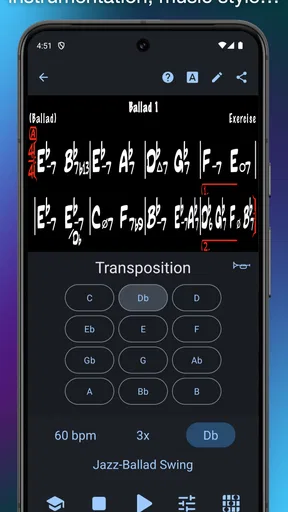
One useful approach is to begin with a comfortable tempo, then raise it only after the chord changes feel secure. Transposing can also turn a familiar chart into a useful test: if you can follow the harmony in another key, you are practising more than finger memory. For singers and instrumentalists, shifting a tune to a workable range can make repetition more productive instead of forcing every session into the original key.
When a section keeps causing trouble, repeating a short passage is more efficient than restarting the entire tune after every mistake. I also like changing the accompaniment style or instrumentation as a deliberate listening exercise: the harmony stays the focus, but a different backing can make me notice where my phrasing needs to leave space. These are modest adjustments, yet they help the app serve a specific practice purpose rather than simply filling the room with sound.
Worth Reading Before You Choose

Flipboard Shows What News Apps Must Do Beyond the Feed

Switching to Android Auto Means Rethinking Your Driving Routine

Google Calendar Makes a Crowded Week Easier to Manage

Ludo King Makes the Most of the Minutes Between Plans

Baby Panda World Brings Quick Play to Modern Phones, but Its Game Library Feels Busy

ESPN’s Live Game View Makes Following Close Games Easier
Who will get the most from it
Jazz players, students working through chord progressions, teachers preparing exercises, and musicians who often practise alone are the clearest fit. The app is also useful when you need to transpose a chart quickly or want accompaniment that can follow a repeatable practice routine. It is less compelling if you mainly want a streaming catalogue, a polished finished mix, or a tool that teaches an instrument from the very beginning. Its strength is musical rehearsal, not replacing every part of a musician’s workflow.
There is a learning curve if you have never thought in chord symbols or chart form. A beginner who needs every note written out may find a chord chart too compressed at first, and a player who depends on notation for every part may prefer a dedicated score-reading or notation tool. I would treat iReal Pro as one part of a practice setup, not as a complete theory course or a full digital audio workstation.
From chart to working arrangement
Imagine having a full band at your fingertips, ready to play any tune you want. That's kind of what iReal Pro offers. It's not just a simple playback tool. It allows you to create, edit, and share musical charts, and then jam along with realistic-sounding accompaniments. Whether you're into jazz, rock, or pop, this app has got you covered.
A World of Music Awaits
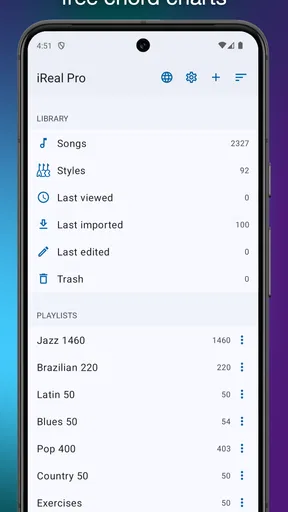
One of the first things you’ll notice is the vast library of chord charts. Seriously, it's like having a music book that never ends. You can download thousands of songs from their forums or create your own chord charts. This feature alone is worth gold for anyone trying to learn new pieces or practice improvisation.
The app covers multiple genres, so whether you're feeling a bit jazzy or want to rock out, you’ll find the right track to practice with. I was particularly impressed by how easy it is to transpose songs. Just a couple of taps, and bam! Your song is in a different key, perfect for vocalists or instrumentalists looking to adjust to their range.
Get Your Groove On
Now, let's talk about the backing tracks. The app doesn’t just give you basic metronome beats. Oh no, it provides you with full accompaniments that sound surprisingly realistic. Whether you need a backing band for a live performance or just want to jam along in your bedroom, these tracks can give you that band-like experience.
And here's a little tip: playing along with these tracks can significantly improve your timing and improvisation skills. It's like having a jam session without the pressure of live bandmates waiting for you to nail that solo.
Customization is Key
One of my favorite features is the level of customization iReal Pro offers. You can change the tempo, style, and even the instruments in your backing tracks. Want to switch the piano to an organ or the acoustic bass to electric? Go for it! This flexibility allows you to tailor each track to your personal preference, making practice sessions more enjoyable and productive.
Learning and Sharing
If you're a music teacher, this app is a valuable tool for your lessons. You can create and share exercises with your students and have them practice specific progressions. The ability to highlight specific bars or repeat sections can help focus on tricky parts of a song.
And it’s not just for teaching. As a learner, you can join the community of musicians using the app. Share your charts, get feedback, or even find new songs to try out. This communal aspect can be incredibly motivating, especially when you're stuck in a practice rut.
Making charts usable from rehearsal to lesson
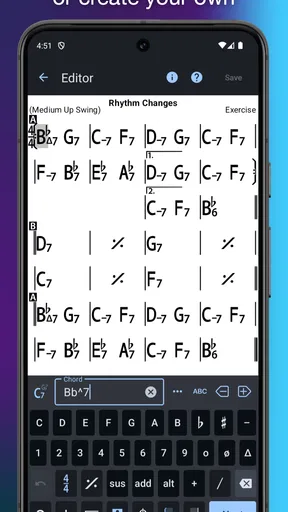
For me, the chart-making side is most useful when I want to capture a progression in a form I can return to, rather than leave it as a half-remembered sequence in a notebook. A teacher could prepare a short exercise around a few changes, share it with a student, and then use the accompaniment to keep the student moving through the form. That is a more repeatable handoff than describing the progression verbally every week.
There is a practical trade-off here: a chord chart is compact, but it assumes the player can read chord symbols and keep track of form. If a student is still learning what the symbols mean, I would explain the harmony separately and use the chart as a prompt, not expect the app to teach those fundamentals by itself. It works best when the musical instruction and the practice material support each other.
Editing with a purpose
I would avoid changing every setting just because it is available. For a new tune, first keep the arrangement simple enough to hear the harmonic rhythm; once the changes are familiar, try a different style or instrumentation to see whether your phrasing still works. If the accompaniment becomes the thing you listen to most, return to a more basic setup and make your own part the focus.
That approach also helps when preparing for a rehearsal. I can use a chart to check the sequence of chords, practise transitions at a manageable pace, and then stop relying on the backing before meeting the group. A generated accompaniment can make repetition convenient, but it cannot tell me how actual bandmates will shape a phrase or react to a cue. I would not use it as the final test of ensemble readiness.
Sharing is a handoff, not a finished production
Sharing a chart is useful when the goal is to give another musician the changes or a practice exercise. It is a different kind of delivery from exporting a finished song: the recipient still brings their own instrument, interpretation, and musical decisions. If you need a polished recording or a complete arrangement with every part written out, this is not the same workflow as a recording or notation studio.
Before sending material to a student or bandmate, I would make sure the chart is clear and that the key and progression suit the intended player. That simple check avoids a common rehearsal snag: everyone has the same tune in mind, but one person is working from a version that does not fit the group. The app’s chart-centered approach is efficient for sharing musical structure, while the actual performance remains a collaborative job.
What to expect before paying
Technimo develops this music and audio app, which has an average rating of 4.7 from around 19,000 ratings and more than 500,000 installs. It costs $21.99, is rated for Everyone, and has been available since August 3, 2011. There are also in-app purchases listed at $6.99 per item, so I would check what an optional purchase covers before deciding whether it matters to my own use.
The price makes most sense if I expect to use the chart and backing-track workflow regularly. If I only need an occasional tempo reference, a simpler metronome is a more sensible starting point. If I want to practise with original performances, recordings will do that job better. The value here comes from being able to work with charts and adjustable accompaniment in one place, not from replacing every music app I already use.
Choosing the right kind of practice partner
One question worth settling before relying on any backing track is whether you need musical flexibility or a faithful recording. For working through harmony, repeating a passage, or testing a different key, an adjustable accompaniment is more practical than searching for a recording that happens to match the exercise. For learning a specific solo or copying a band’s feel, a real performance is the stronger reference. I would keep both approaches in a practice routine rather than expecting one to cover the other’s strengths.
Another useful question is whether you need to create charts yourself. If you already have progressions to work on, making a chart can turn them into reusable practice material. If you mainly want to browse and play without editing anything, the chart-creation tools may matter less, though the accompaniment can still be the draw. The app makes the most sense when you want to participate in shaping the session, not merely press play on a fixed playlist.
A good fit, with clear boundaries
For a working musician, the strongest everyday use may be small and unglamorous: check a key before a lesson, run a progression before rehearsal, or give a student a consistent backing while they practise alone. Those jobs do not require a studio setup, but they do benefit from having the harmony and accompaniment close together. I find that focused role more convincing than treating the app as a replacement for a real band.
It is also worth being honest about what “realistic” accompaniment can and cannot mean. A backing track offers a steady musical context, but it does not listen, adjust its dynamics to your playing, or negotiate an ending with you. Players who need that responsive interaction should schedule time with other musicians. For solo practice, though, a dependable framework can be exactly what helps a tune move from unfamiliar to playable.
Final Thoughts
iReal Pro: Backing Tracks isn’t just another music app. It’s a versatile tool for musicians at any stage of their journey. Whether you're a newbie trying to get the hang of chord progressions or a pro looking for a reliable practice partner, this app can meet your needs. The ability to create, customize, and jam with high-quality tracks makes it a must-have for anyone serious about music.
So, if you haven’t already, give iReal Pro a whirl. Trust me, your future jam sessions will thank you!
Pros
- User-friendly interface for easy navigation.
- Wide range of musical styles available.
- Customizable backing tracks for practice.
- High-quality audio output enhances experience.
- Regular updates with new features.
Cons
- Subscription required for full access.
- Limited free features may deter casual users.
- No built-in tuner for instruments.
- Lacks support for some lesser-known genres.
- Requires internet for some features.
FAQs for iReal Pro
What is iReal Pro: Backing Tracks used for?
iReal Pro: Backing Tracks is a versatile app designed for musicians who want to practice with customizable backing tracks. It provides chord charts and allows users to create, edit, and share their own musical compositions. Whether you're a jazz enthusiast or a pop player, this app offers a wide range of musical styles to enhance your practice sessions.
Can iReal Pro be used offline?
Yes, iReal Pro can be used offline. Once you have downloaded the app and the desired songs or backing tracks, you can access them without an internet connection. This feature is particularly useful for practicing on the go or in areas with limited connectivity.
Is iReal Pro suitable for beginners?
While iReal Pro is a powerful tool for musicians of all levels, beginners may find the interface and features a bit overwhelming at first. However, the app includes tutorials and a user-friendly community to help new users get started. It's an excellent resource for learning chord progressions and improving musical skills.
Can I import my own songs into iReal Pro?
Yes, iReal Pro allows users to import their own songs. You can input chord progressions manually or import songs from external sources like forums or music libraries. This feature ensures that you can practice with your favorite tunes and tailor your practice sessions to your needs.
What are the main pros and cons of iReal Pro?
Pros include a vast library of styles, customizable backing tracks, and offline access. It's suitable for various music genres and skill levels. However, cons might include a learning curve for new users and the cost of the app, which might be a consideration for some. Overall, it's a valuable tool for serious musicians.


